



Reworked API Documentation
Welcome to the official Reworked.ai API documentation. Our REST API lets you add opportunity scoring and generate AI-qualified opportunities directly to your existing systems and workflows, so you can focus on high-quality prospects and stop spending money on low-quality ones.
This document is the complete technical reference for both of Reworked.ai’s API suites:
Lead Scoring API. Submit your existing prospect files for AI-powered scoring and enrichment, so you can prioritize the best ones.
Opportunities API. Generate and purchase new opportunities by zip code, city, county, or a radius around an address, with optional add-ons for enrichment and mail or digital ad campaigns.
BASE URL
Contact your point of contact at Reworked.ai to obtain the base URL
CLIENT LIBRARIES





Generate JWT Tokens
Authentication with the Reworked.ai API is handled through JSON Web Tokens (JWT). This secure authentication method ensures that only authorized applications can access your lead data and our scoring services.
To authenticate with our API:
Generate an API key in your Reworked.ai dashboard
Exchange your API key for a JWT token using the authentication endpoint
Include this token in the authorization header of subsequent requests
The JWT token will be valid for 48 hours, after which you'll need to generate a new one.
ENDPOINT
/generate-token
METHOD
POST
Request Body
When sending leads for scoring, your request body should include all relevant lead information. The more data you provide, the more accurate our scoring will be.
api_key
will be provided by Reworked.
email id you used to create an account on Reworked.ai.
REQUEST BODY
{
"api_key": "api-key",
"email": "abc@gmail.com"
}
Response
The Reworked.ai API returns a structured response.
Status Code
200
The token should be sent as an authorization header in the
process-leads
API
RESPONSE
{
"msg": "Token generated successfully",
"data": {
"token": "Auth Token",
"expiresAt": "Timestamp"
}
}
Error Cases
Our API includes comprehensive error handling to help you quickly diagnose and resolve issues during integration.
Status Code
404
CASE 1
{
"msg": "Api key is invalid",
"data": null
}
CASE 2
{
"msg": "Customer data not found",
"data": null
}
Lead Scoring API
Lead Scoring API
Lead Scoring API
The Lead Scoring API enables authorized users to submit existing lead data for AI-powered scoring and enrichment. Leads can be submitted through a file URL or inline JSON payload. Reworked.ai processes lead data according to the selected industry profile, applying industry-specific enrichment and scoring logic to help businesses identify, evaluate, and prioritize potential opportunities.
The Lead Scoring API enables authorized users to submit existing lead data for AI-powered scoring and enrichment. Leads can be submitted through a file URL or inline JSON payload. Reworked.ai processes lead data according to the selected industry profile, applying industry-specific enrichment and scoring logic to help businesses identify, evaluate, and prioritize potential opportunities.
The Lead Scoring API enables authorized users to submit existing lead data for AI-powered scoring and enrichment. Leads can be submitted through a file URL or inline JSON payload. Reworked.ai processes lead data according to the selected industry profile, applying industry-specific enrichment and scoring logic to help businesses identify, evaluate, and prioritize potential opportunities.
•
Supports multiple industries, including Roofing and Real Estate Investors. The selected industry profile determines which enrichment and scoring workflows are applied.
Supports multiple industries, including Roofing and Real Estate Investors. The selected industry profile determines which enrichment and scoring workflows are applied.
Supports multiple industries, including Roofing and Real Estate Investors. The selected industry profile determines which enrichment and scoring workflows are applied.
ENDPOINT
Copy
Copy
Copy
POST {{base_url}}/api/process-leads
POST {{base_url}}/api/process-leads
POST {{base_url}}/api/process-leads
AUTHENTICATION
Copy
Copy
Copy
Authorization: Bearer <your-jwt-token>
Content-Type: application/json
Authorization: Bearer <your-jwt-token>
Content-Type: application/json
Authorization: Bearer <your-jwt-token>
Content-Type: application/json
TOKEN EXPIRY
Copy
Copy
Copy
JWT tokens are valid for 24 hours. Generate a new token after expiry.
JWT tokens are valid for 24 hours. Generate a new token after expiry.
JWT tokens are valid for 24 hours. Generate a new token after expiry.
Process Leads
Process Leads
Process Leads
Submit lead records by file URL or inline JSON. If both industry_profile_type and industry_profile_id are provided, industry_profile_type takes precedence. If no profile is specified, processing depends on your account’s default behavior.
Submit lead records by file URL or inline JSON. If both industry_profile_type and industry_profile_id are provided, industry_profile_type takes precedence. If no profile is specified, processing depends on your account’s default behavior.
Submit lead records by file URL or inline JSON. If both industry_profile_type and industry_profile_id are provided, industry_profile_type takes precedence. If no profile is specified, processing depends on your account’s default behavior.
•
Authorization
Authorization
Authorization
Required string. Valid authentication token obtained from /generate-token.
Required string. Valid authentication token obtained from /generate-token.
Required string. Valid authentication token obtained from /generate-token.
•
Required string. Email associated with the user’s Reworked.ai account.
Required string. Email associated with the user’s Reworked.ai account.
Required string. Email associated with the user’s Reworked.ai account.
•
input_type
input_type
input_type
Required string. Supported values: url and json.
Required string. Supported values: url and json.
Required string. Supported values: url and json.
•
file_url
file_url
file_url
Conditional string. Required when input_type is url.
Conditional string. Required when input_type is url.
Conditional string. Required when input_type is url.
•
input_data
input_data
input_data
Conditional object. Required when input_type is json.
Conditional object. Required when input_type is json.
Conditional object. Required when input_type is json.
•
industry_profile_type
industry_profile_type
industry_profile_type
Optional string, e.g. ROOFING or REAL_ESTATE_INVESTORS.
Optional string, e.g. ROOFING or REAL_ESTATE_INVESTORS.
Optional string, e.g. ROOFING or REAL_ESTATE_INVESTORS.
•
industry_profile_id
industry_profile_id
industry_profile_id
Optional string. Identifier of a specific industry profile.
Optional string. Identifier of a specific industry profile.
Optional string. Identifier of a specific industry profile.
•
callback_url
callback_url
callback_url
Optional string. Webhook URL for completion notification.
Optional string. Webhook URL for completion notification.
Optional string. Webhook URL for completion notification.
•
overwrite
overwrite
overwrite
Optional boolean. Whether duplicate records should be overwritten.
Optional boolean. Whether duplicate records should be overwritten.
Optional boolean. Whether duplicate records should be overwritten.
•
customer_request_id
customer_request_id
customer_request_id
Optional string. External tracking identifier supplied by the customer.
Optional string. External tracking identifier supplied by the customer.
Optional string. External tracking identifier supplied by the customer.
FILE-BASED REQUEST
Copy
Copy
Copy
POST {{base_url}}/api/process-leads
Authorization: Bearer <your-jwt-token>
Content-Type: application/json
{
“email”: “you@company.com”,
“input_type”: “url”,
“file_url”: “https://storage.example.com/leads.csv”,
“callback_url”: “https://your-app.com/webhooks/reworked”,
“overwrite”: true,
“industry_profile_type”: “ROOFING”,
“customer_request_id”: “batch-2026-001”
}
POST {{base_url}}/api/process-leads
Authorization: Bearer <your-jwt-token>
Content-Type: application/json
{
“email”: “you@company.com”,
“input_type”: “url”,
“file_url”: “https://storage.example.com/leads.csv”,
“callback_url”: “https://your-app.com/webhooks/reworked”,
“overwrite”: true,
“industry_profile_type”: “ROOFING”,
“customer_request_id”: “batch-2026-001”
}
POST {{base_url}}/api/process-leads
Authorization: Bearer <your-jwt-token>
Content-Type: application/json
{
“email”: “you@company.com”,
“input_type”: “url”,
“file_url”: “https://storage.example.com/leads.csv”,
“callback_url”: “https://your-app.com/webhooks/reworked”,
“overwrite”: true,
“industry_profile_type”: “ROOFING”,
“customer_request_id”: “batch-2026-001”
}
INLINE JSON REQUEST
Copy
Copy
Copy
{
“email”: “you@company.com”,
“input_type”: “json”,
“input_data”: {
“replace_with”: “lead data matching the supported JSON schema”
},
“industry_profile_type”: “REAL_ESTATE_INVESTORS”,
“customer_request_id”: “request-2026-001”
}
{
“email”: “you@company.com”,
“input_type”: “json”,
“input_data”: {
“replace_with”: “lead data matching the supported JSON schema”
},
“industry_profile_type”: “REAL_ESTATE_INVESTORS”,
“customer_request_id”: “request-2026-001”
}
{
“email”: “you@company.com”,
“input_type”: “json”,
“input_data”: {
“replace_with”: “lead data matching the supported JSON schema”
},
“industry_profile_type”: “REAL_ESTATE_INVESTORS”,
“customer_request_id”: “request-2026-001”
}
Input Methods and Required Columns
Input Methods and Required Columns
Input Methods and Required Columns
For file-based input, provide a fetchable file URL containing the lead dataset. For inline JSON input, provide lead data directly in input_data. Required columns depend on the selected industry profile and must match the expected schema exactly.
For file-based input, provide a fetchable file URL containing the lead dataset. For inline JSON input, provide lead data directly in input_data. Required columns depend on the selected industry profile and must match the expected schema exactly.
For file-based input, provide a fetchable file URL containing the lead dataset. For inline JSON input, provide lead data directly in input_data. Required columns depend on the selected industry profile and must match the expected schema exactly.
•
owner_full_name
owner_full_name
owner_full_name
Required. Full name of the property owner.
Required. Full name of the property owner.
Required. Full name of the property owner.
•
mail_street_address
mail_street_address
mail_street_address
Required. Mailing street address.
Required. Mailing street address.
Required. Mailing street address.
•
mail_city
mail_city
mail_city
Required. Mailing city.
Required. Mailing city.
Required. Mailing city.
•
mail_state
mail_state
mail_state
Required. Mailing state.
Required. Mailing state.
Required. Mailing state.
•
mail_zip_code
mail_zip_code
mail_zip_code
Required. Mailing ZIP code.
Required. Mailing ZIP code.
Required. Mailing ZIP code.
•
Property_zip_code
Property_zip_code
Property_zip_code
Industry-specific. Required for Real Estate Investors where applicable.
Industry-specific. Required for Real Estate Investors where applicable.
Industry-specific. Required for Real Estate Investors where applicable.
•
Additional fields may be required depending on the selected industry profile and enrichment workflow.
Additional fields may be required depending on the selected industry profile and enrichment workflow.
Additional fields may be required depending on the selected industry profile and enrichment workflow.
INPUT METHODS
Copy
Copy
Copy
1. File-based input
input_type: “url”
file_url: “https://…/leads.csv”
2. Inline JSON input
input_type: “json”
input_data: { … }
1. File-based input
input_type: “url”
file_url: “https://…/leads.csv”
2. Inline JSON input
input_type: “json”
input_data: { … }
1. File-based input
input_type: “url”
file_url: “https://…/leads.csv”
2. Inline JSON input
input_type: “json”
input_data: { … }
REAL ESTATE INVESTORS
Copy
Copy
Copy
To process leads for real estate investors, set:
“industry_profile_type”: “REAL_ESTATE_INVESTORS”
Then ensure the payload contains the required fields for that profile.
To process leads for real estate investors, set:
“industry_profile_type”: “REAL_ESTATE_INVESTORS”
Then ensure the payload contains the required fields for that profile.
To process leads for real estate investors, set:
“industry_profile_type”: “REAL_ESTATE_INVESTORS”
Then ensure the payload contains the required fields for that profile.
Success Response and Statuses
Success Response and Statuses
Success Response and Statuses
A successful response means processing has been initiated. It does not necessarily mean scoring and enrichment have completed. Use /file-status with the returned status-check token to track progress.
A successful response means processing has been initiated. It does not necessarily mean scoring and enrichment have completed. Use /file-status with the returned status-check token to track progress.
A successful response means processing has been initiated. It does not necessarily mean scoring and enrichment have completed. Use /file-status with the returned status-check token to track progress.
•
msg
msg
msg
Message describing the result of the submission.
Message describing the result of the submission.
Message describing the result of the submission.
•
data.token
data.token
data.token
Token used to check processing status through /file-status.
Token used to check processing status through /file-status.
Token used to check processing status through /file-status.
•
data.file_upload_identifier
data.file_upload_identifier
data.file_upload_identifier
Unique identifier associated with the processing request.
Unique identifier associated with the processing request.
Unique identifier associated with the processing request.
•
data.status
data.status
data.status
Current processing status.
Current processing status.
Current processing status.
•
PROCESSING
PROCESSING
PROCESSING
The request is being processed.
The request is being processed.
The request is being processed.
•
PROCESSED
PROCESSED
PROCESSED
Processing completed successfully.
Processing completed successfully.
Processing completed successfully.
•
ERROR
ERROR
ERROR
Processing encountered an error.
Processing encountered an error.
Processing encountered an error.
•
UNDERREVIEW
UNDERREVIEW
UNDERREVIEW
The request requires review.
The request requires review.
The request requires review.
SUCCESS RESPONSE (200)
Copy
Copy
Copy
{
“msg”: “File processing started”,
“data”: {
“token”: “status-check-token”,
“file_upload_identifier”: “abc123”,
“status”: “PROCESSING”
}
}
{
“msg”: “File processing started”,
“data”: {
“token”: “status-check-token”,
“file_upload_identifier”: “abc123”,
“status”: “PROCESSING”
}
}
{
“msg”: “File processing started”,
“data”: {
“token”: “status-check-token”,
“file_upload_identifier”: “abc123”,
“status”: “PROCESSING”
}
}
Error Responses and Notes
Error Responses and Notes
Error Responses and Notes
The endpoint may return 400 Bad Request for invalid or incomplete input, authentication issues, unsupported configuration values, invalid industry profiles, or submitted data that does not meet the required schema.
The endpoint may return 400 Bad Request for invalid or incomplete input, authentication issues, unsupported configuration values, invalid industry profiles, or submitted data that does not meet the required schema.
The endpoint may return 400 Bad Request for invalid or incomplete input, authentication issues, unsupported configuration values, invalid industry profiles, or submitted data that does not meet the required schema.
•
Duplicate prevention: equivalent file submissions may be detected and returned as duplicates instead of reprocessing.
Duplicate prevention: equivalent file submissions may be detected and returned as duplicates instead of reprocessing.
Duplicate prevention: equivalent file submissions may be detected and returned as duplicates instead of reprocessing.
•
Data overwrite: set overwrite to true when existing duplicate records should be replaced, subject to overwrite rules.
Data overwrite: set overwrite to true when existing duplicate records should be replaced, subject to overwrite rules.
Data overwrite: set overwrite to true when existing duplicate records should be replaced, subject to overwrite rules.
•
Asynchronous processing: use /file-status or the configured callback URL to track completion.
Asynchronous processing: use /file-status or the configured callback URL to track completion.
Asynchronous processing: use /file-status or the configured callback URL to track completion.
•
Request tracking: use customer_request_id to map API requests to your internal jobs, batches, or workflows.
Request tracking: use customer_request_id to map API requests to your internal jobs, batches, or workflows.
Request tracking: use customer_request_id to map API requests to your internal jobs, batches, or workflows.
CASE 1: INVALID API KEY
Copy
Copy
Copy
{
“msg”: “Api key is invalid”,
“data”: null
}
{
“msg”: “Api key is invalid”,
“data”: null
}
{
“msg”: “Api key is invalid”,
“data”: null
}
CASE 2: MISSING FILE URL
Copy
Copy
Copy
{
“msg”: “File url is missing”,
“data”: null
}
{
“msg”: “File url is missing”,
“data”: null
}
{
“msg”: “File url is missing”,
“data”: null
}
File Status
The /file-status endpoint enables clients to check the current processing state of a previously submitted file.
To use this endpoint:
Include the authorization token received from the
/process-leadsresponse in theAuthorizationheader.Submit a
POSTrequest with thefile_upload_identifier(also from/process-leads) and your email address.
Possible File Processing Statuses
PROCESSING: The file is currently being processed.UNDERREVIEW: Processing is complete but results are undergoing review. Expect completion within 12 hours.PROCESSED: The file has been successfully processed.ERROR: Processing could not be completed due to one or more issues.
ENDPOINT
file-status
METHOD
POST
Headers
Authorization
token from process-leads API response
HEADERS
{
"Authorization": "token from process-leads API response"
}
Request Body
When sending leads for scoring, your request body should include all relevant lead information. The more data you provide, the more accurate our scoring will be.
file_upload_identifier
The unique identifier is obtained
from the process-leads response
email id you used to create an account on Reworked.ai.
REQUEST BODY
{
"file_upload_identifier": "file upload identifier",
"email": "abc@gmail.com" ,
}
Response
Response of the /process-leads api
Status Code
200
file_upload_identifier
unique identifier of your request
RESPONSE
{
"msg": "File is already in process, pls check after sometime",
"data": {
"error_detail"null,
"token": "Auth Token",
"file_upload_identifier": "file upload identifier",
"status":"PROCESSING"
}
}
Response
Response of the /process-leads api
Status Code
200
file_upload_identifier
unique identifier of your request
RESPONSE
{
"msg": "File is under review, it should be processed within the next 12hrs",
"data": {
"error_detail"null,
"token": "Auth Token",
"file_upload_identifier": "file upload identifier",
"status":"UNDERREVIEW"
}
}
Error Cases
Our API includes comprehensive error handling to help you quickly diagnose and resolve issues during integration.
Status Code
401
Status Code
500
CASE 1
{
"msg": "Api key is invalid",
"data": null
}
CASE 2
{
"msg": "Error 103: Requisite columns required to generate a Betty Score is not present. Please contact admin@reworked.ai or call at +1 (888) 557-9675.",
"data": {
"error_detail":"Error 103: Requisite columns required to generate a Betty Score is not present. Please contact admin@reworked.ai or call at +1 888 306 1949."
"status": "ERROR"
}
}
API Flowchart
API Flowchart
Below is the sequence diagram for API initialization:
Client application requests authentication token
Reworked.ai validates credentials and returns JWT
Client sends lead data with the authorization token
Reworked.ai processes and scores the lead
Response with score and insights is returned to client
Below is the sequence diagram for API initialization:
Client application requests authentication token
Reworked.ai validates credentials and returns JWT
Client sends lead data with the authorization token
Reworked.ai processes and scores the lead
Response with score and insights is returned to client
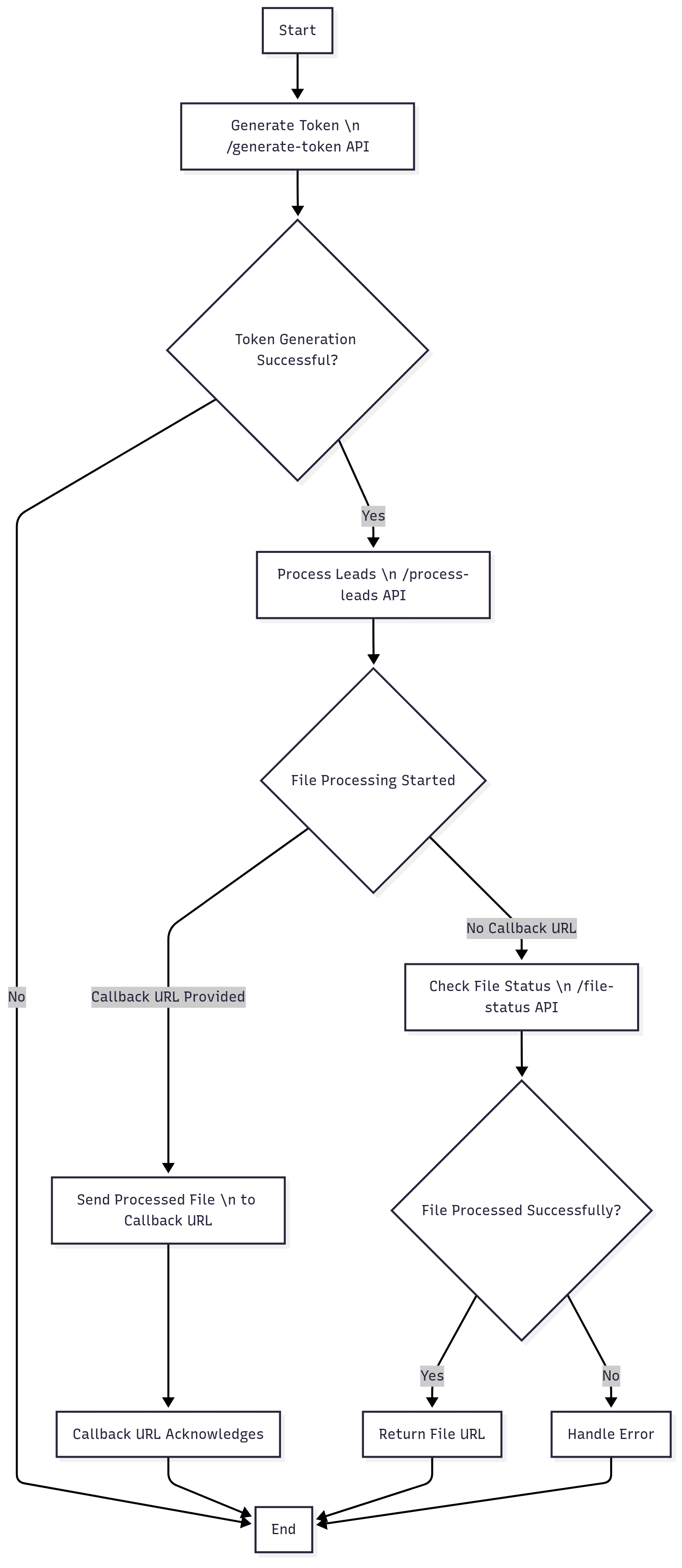
API Sequence Diagram
Below is the sequence diagram for API interactions:
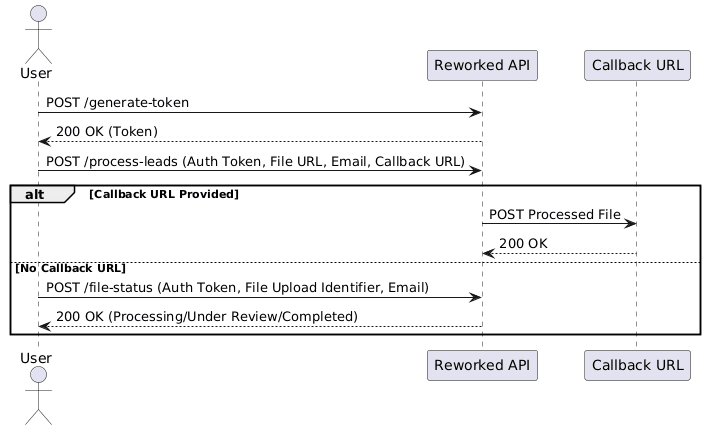
For bulk scoring operations, our API supports large batches of leads efficiently.
Rate Limit: 50,000 records in a file
Opportunities API
Opportunities API
Opportunities API
The Opportunities API lets you generate, purchase and track roofing opportunities by geography and job type. Use count to see what is available in a target area, or buy to purchase a set of qualified opportunities.
The Opportunities API lets you generate, purchase and track roofing opportunities by geography and job type. Use count to see what is available in a target area, or buy to purchase a set of qualified opportunities.
The Opportunities API lets you generate, purchase and track roofing opportunities by geography and job type. Use count to see what is available in a target area, or buy to purchase a set of qualified opportunities.
•
Include the bearer token from /generate-token in the Authorization header.
Include the bearer token from /generate-token in the Authorization header.
Include the bearer token from /generate-token in the Authorization header.
•
Submit a POST request with your email in the headers and the request body fields below.
Submit a POST request with your email in the headers and the request body fields below.
Submit a POST request with your email in the headers and the request body fields below.
•
Poll /api/opportunity-status with the returned id until the status is processed.
Poll /api/opportunity-status with the returned id until the status is processed.
Poll /api/opportunity-status with the returned id until the status is processed.
ENDPOINT
Copy
Copy
Copy
{{base_url}}/api/opportunities
{{base_url}}/api/opportunities
{{base_url}}/api/opportunities
METHOD
Copy
Copy
Copy
POST
POST
POST
HEADERS
Copy
Copy
Copy
{
“email”: “abc@gmail.com”,
“Authorization”: “Bearer <token from /generate-token>“
}
{
“email”: “abc@gmail.com”,
“Authorization”: “Bearer <token from /generate-token>“
}
{
“email”: “abc@gmail.com”,
“Authorization”: “Bearer <token from /generate-token>“
}
Headers
Headers
Headers
•
Your Reworked.ai account email. Required
Your Reworked.ai account email. Required
•
Authorization
Authorization
Authorization
Bearer token from /generate-token. Required
Bearer token from /generate-token. Required
Request Body
Request Body
Request Body
Provide exactly one location mode per request. The type field controls whether you count available opportunities or buy qualified opportunities.
Provide exactly one location mode per request. The type field controls whether you count available opportunities or buy qualified opportunities.
Provide exactly one location mode per request. The type field controls whether you count available opportunities or buy qualified opportunities.
•
type
type
type
count returns the total available; buy purchases opportunities. Required
count returns the total available; buy purchases opportunities. Required
•
location
location
location
One valid location mode. Required
One valid location mode. Required
•
industry_profile_id
industry_profile_id
industry_profile_id
Industry Profile ID. Optional
Industry Profile ID. Optional
•
job_type
job_type
job_type
Type of roofing job, e.g. roof-replacement or roof-rejuvenation. Optional
Type of roofing job, e.g. roof-replacement or roof-rejuvenation. Optional
•
opportunity_count
opportunity_count
opportunity_count
Number to purchase. Required for buy in standard modes; defaults to 100 in radius mode
Number to purchase. Required for buy in standard modes; defaults to 100 in radius mode
•
external_id
external_id
external_id
Your internal reference, returned as-is in responses. Optional
Your internal reference, returned as-is in responses. Optional
•
addons
addons
addons
Array of enrichment or campaign keys. Optional
Array of enrichment or campaign keys. Optional
•
callback
callback
callback
Webhook URL and headers for async result delivery. Optional
Webhook URL and headers for async result delivery. Optional
REQUEST BODY
Copy
Copy
Copy
{
“type”: “buy”,
“city”: “Holtsville”,
“state”: “NY”,
“industry_profile_id”: “6925605fcc26d50e46737be3”,
“job_type”: “roof-replacement”,
“opportunity_count”: 100,
“external_id”: “your-internal-reference-123”,
“addons”: [“roof_area_estimate”],
“callback”: {
“url”: “https://client.app/webhooks/opportunities”,
“headers”: { “Authorization”: “Bearer callback-secret” }
}
}
{
“type”: “buy”,
“city”: “Holtsville”,
“state”: “NY”,
“industry_profile_id”: “6925605fcc26d50e46737be3”,
“job_type”: “roof-replacement”,
“opportunity_count”: 100,
“external_id”: “your-internal-reference-123”,
“addons”: [“roof_area_estimate”],
“callback”: {
“url”: “https://client.app/webhooks/opportunities”,
“headers”: { “Authorization”: “Bearer callback-secret” }
}
}
{
“type”: “buy”,
“city”: “Holtsville”,
“state”: “NY”,
“industry_profile_id”: “6925605fcc26d50e46737be3”,
“job_type”: “roof-replacement”,
“opportunity_count”: 100,
“external_id”: “your-internal-reference-123”,
“addons”: [“roof_area_estimate”],
“callback”: {
“url”: “https://client.app/webhooks/opportunities”,
“headers”: { “Authorization”: “Bearer callback-secret” }
}
}
Location Modes
Location Modes
Location Modes
Four mutually exclusive modes. Do not mix fields from different modes.
Four mutually exclusive modes. Do not mix fields from different modes.
Four mutually exclusive modes. Do not mix fields from different modes.
•
Mode 1: Zip Code — zip accepts a 5-digit zip code or an array of zip codes.
Mode 1: Zip Code — zip accepts a 5-digit zip code or an array of zip codes.
Mode 1: Zip Code — zip accepts a 5-digit zip code or an array of zip codes.
•
Mode 2: City + State — city and 2-letter state code are required.
Mode 2: City + State — city and 2-letter state code are required.
Mode 2: City + State — city and 2-letter state code are required.
•
Mode 3: County + State — county and 2-letter state code are required.
Mode 3: County + State — county and 2-letter state code are required.
Mode 3: County + State — county and 2-letter state code are required.
•
Mode 4: Radius — address is required; radius defaults to 1 mile.
Mode 4: Radius — address is required; radius defaults to 1 mile.
Mode 4: Radius — address is required; radius defaults to 1 mile.
LOCATION MODES
Copy
Copy
Copy
{ “zip”: “11742” }
{ “zip”: [“11742”, “11743”] }
{ “city”: “Holtsville”, “state”: “NY” }
{ “county”: “Suffolk”, “state”: “NY” }
{
“address”: “123 Main St, Holtsville, NY 11742”,
“radius”: 2,
“opportunity_count”: 100
}
{ “zip”: “11742” }
{ “zip”: [“11742”, “11743”] }
{ “city”: “Holtsville”, “state”: “NY” }
{ “county”: “Suffolk”, “state”: “NY” }
{
“address”: “123 Main St, Holtsville, NY 11742”,
“radius”: 2,
“opportunity_count”: 100
}
{ “zip”: “11742” }
{ “zip”: [“11742”, “11743”] }
{ “city”: “Holtsville”, “state”: “NY” }
{ “county”: “Suffolk”, “state”: “NY” }
{
“address”: “123 Main St, Holtsville, NY 11742”,
“radius”: 2,
“opportunity_count”: 100
}
Request Examples
Request Examples
Request Examples
Count returns the total opportunities available for an area. Buy with radius can use defaults: 1 mile and 100 opportunities. Every request returns a processing confirmation. Use the returned id with /api/opportunity-status.
Count returns the total opportunities available for an area. Buy with radius can use defaults: 1 mile and 100 opportunities. Every request returns a processing confirmation. Use the returned id with /api/opportunity-status.
Count returns the total opportunities available for an area. Buy with radius can use defaults: 1 mile and 100 opportunities. Every request returns a processing confirmation. Use the returned id with /api/opportunity-status.
COUNT: COUNTY + STATE
Copy
Copy
Copy
{
“type”: “count”,
“county”: “Suffolk”,
“state”: “NY”,
“industry_profile_id”: “6925605fcc26d50e46737be3”,
“job_type”: “roof-replacement”,
“callback”: {
“url”: “https://client.app/webhooks/opportunities”,
“headers”: { “Authorization”: “Bearer callback-secret” }
}
}
{
“type”: “count”,
“county”: “Suffolk”,
“state”: “NY”,
“industry_profile_id”: “6925605fcc26d50e46737be3”,
“job_type”: “roof-replacement”,
“callback”: {
“url”: “https://client.app/webhooks/opportunities”,
“headers”: { “Authorization”: “Bearer callback-secret” }
}
}
{
“type”: “count”,
“county”: “Suffolk”,
“state”: “NY”,
“industry_profile_id”: “6925605fcc26d50e46737be3”,
“job_type”: “roof-replacement”,
“callback”: {
“url”: “https://client.app/webhooks/opportunities”,
“headers”: { “Authorization”: “Bearer callback-secret” }
}
}
BUY: RADIUS (MINIMAL)
Copy
Copy
Copy
{
“type”: “buy”,
“address”: “123 Main St, Holtsville, NY 11742”,
“industry_profile_id”: “6925605fcc26d50e46737be3”,
“job_type”: “roof-replacement”
}
{
“type”: “buy”,
“address”: “123 Main St, Holtsville, NY 11742”,
“industry_profile_id”: “6925605fcc26d50e46737be3”,
“job_type”: “roof-replacement”
}
{
“type”: “buy”,
“address”: “123 Main St, Holtsville, NY 11742”,
“industry_profile_id”: “6925605fcc26d50e46737be3”,
“job_type”: “roof-replacement”
}
RESPONSE
Copy
Copy
Copy
{
“msg”: “Opportunities Processing Started”,
“data”: {
“request”: { “…”: “request body contents” },
“response”: {
“id”: “6985e57bad0e7ed8477579b1”,
“status”: “processing”
}
}
}
{
“msg”: “Opportunities Processing Started”,
“data”: {
“request”: { “…”: “request body contents” },
“response”: {
“id”: “6985e57bad0e7ed8477579b1”,
“status”: “processing”
}
}
}
{
“msg”: “Opportunities Processing Started”,
“data”: {
“request”: { “…”: “request body contents” },
“response”: {
“id”: “6985e57bad0e7ed8477579b1”,
“status”: “processing”
}
}
}
Check Opportunity Status
Check Opportunity Status
Check Opportunity Status
Poll this endpoint to track progress and retrieve results. Completed responses differ by request type.
Poll this endpoint to track progress and retrieve results. Completed responses differ by request type.
Poll this endpoint to track progress and retrieve results. Completed responses differ by request type.
•
in_progress — the system is fetching and enriching data.
in_progress — the system is fetching and enriching data.
in_progress — the system is fetching and enriching data.
•
processed — data is ready. For count: total available. For buy: a download URL.
processed — data is ready. For count: total available. For buy: a download URL.
processed — data is ready. For count: total available. For buy: a download URL.
•
failed — an error occurred during processing.
failed — an error occurred during processing.
failed — an error occurred during processing.
ENDPOINT
Copy
Copy
Copy
{{base_url}}/api/opportunity-status
{{base_url}}/api/opportunity-status
{{base_url}}/api/opportunity-status
REQUEST BODY
Copy
Copy
Copy
{ “id”: “6957cdc983c856006ea70d46” }
{ “id”: “6957cdc983c856006ea70d46” }
{ “id”: “6957cdc983c856006ea70d46” }
COUNT: COMPLETED
Copy
Copy
Copy
{
“request”: { “id”: “6985e551ad0e7ed8477579b0” },
“response”: {
“msg”: “Opportunities count fetched successfully”,
“data”: {
“id”: “6985e551ad0e7ed8477579b0”,
“max_opportunities_count”: 84197,
“status”: “processed”
}
}
}
{
“request”: { “id”: “6985e551ad0e7ed8477579b0” },
“response”: {
“msg”: “Opportunities count fetched successfully”,
“data”: {
“id”: “6985e551ad0e7ed8477579b0”,
“max_opportunities_count”: 84197,
“status”: “processed”
}
}
}
{
“request”: { “id”: “6985e551ad0e7ed8477579b0” },
“response”: {
“msg”: “Opportunities count fetched successfully”,
“data”: {
“id”: “6985e551ad0e7ed8477579b0”,
“max_opportunities_count”: 84197,
“status”: “processed”
}
}
}
BUY: COMPLETED
Copy
Copy
Copy
{
“request”: { “id”: “698623bf405b83e9b9e6f083” },
“response”: {
“msg”: “Opportunities Purchased Successfully”,
“data”: {
“id”: “698623bf405b83e9b9e6f083”,
“external_id”: “your-internal-reference-123”,
“max_opportunities_count”: 660,
“file_url”: “https://s3-url…”,
“status”: “processed”
}
}
}
{
“request”: { “id”: “698623bf405b83e9b9e6f083” },
“response”: {
“msg”: “Opportunities Purchased Successfully”,
“data”: {
“id”: “698623bf405b83e9b9e6f083”,
“external_id”: “your-internal-reference-123”,
“max_opportunities_count”: 660,
“file_url”: “https://s3-url…”,
“status”: “processed”
}
}
}
{
“request”: { “id”: “698623bf405b83e9b9e6f083” },
“response”: {
“msg”: “Opportunities Purchased Successfully”,
“data”: {
“id”: “698623bf405b83e9b9e6f083”,
“external_id”: “your-internal-reference-123”,
“max_opportunities_count”: 660,
“file_url”: “https://s3-url…”,
“status”: “processed”
}
}
}
Add-Ons (Roofing)
Add-Ons (Roofing)
Add-Ons (Roofing)
Pass these keys in the addons array to enrich each opportunity or launch a campaign. Add-ons work in all location modes, including radius, and apply to roofing accounts only.
Pass these keys in the addons array to enrich each opportunity or launch a campaign. Add-ons work in all location modes, including radius, and apply to roofing accounts only.
Pass these keys in the addons array to enrich each opportunity or launch a campaign. Add-ons work in all location modes, including radius, and apply to roofing accounts only.
•
roof_area_estimate
roof_area_estimate
roof_area_estimate
Roof area, facets and squares for accurate quoting.
Roof area, facets and squares for accurate quoting.
•
phone_no_append
phone_no_append
phone_no_append
Verified phone number for calling campaigns.
Verified phone number for calling campaigns.
•
email_append
email_append
email_append
Verified email address for digital campaigns.
Verified email address for digital campaigns.
•
roof_type
roof_type
roof_type
Roof material such as asphalt, metal or tile.
Roof material such as asphalt, metal or tile.
•
google_satellite_image
google_satellite_image
google_satellite_image
Standard-resolution Google aerial view.
Standard-resolution Google aerial view.
•
direct_mail_campaign
direct_mail_campaign
direct_mail_campaign
Configurable letter and postcard sequence.
Configurable letter and postcard sequence.
•
digital_ads_campaign
digital_ads_campaign
digital_ads_campaign
Display ads served to purchased households.
Display ads served to purchased households.
BUY: CITY + STATE WITH ADD-ONS
Copy
Copy
Copy
{
“type”: “buy”,
“city”: “Holtsville”,
“state”: “NY”,
“opportunity_count”: 100,
“addons”: [“roof_area_estimate”, “phone_no_append”, “email_append”],
“job_type”: “roof-replacement”
}
{
“type”: “buy”,
“city”: “Holtsville”,
“state”: “NY”,
“opportunity_count”: 100,
“addons”: [“roof_area_estimate”, “phone_no_append”, “email_append”],
“job_type”: “roof-replacement”
}
{
“type”: “buy”,
“city”: “Holtsville”,
“state”: “NY”,
“opportunity_count”: 100,
“addons”: [“roof_area_estimate”, “phone_no_append”, “email_append”],
“job_type”: “roof-replacement”
}
BUY: RADIUS WITH OVERRIDES
Copy
Copy
Copy
{
“type”: “buy”,
“address”: “123 Main St, Holtsville, NY 11742”,
“radius”: 2,
“opportunity_count”: 100,
“job_type”: “roof-replacement”,
“addons”: [“roof_area_estimate”, “phone_no_append”]
}
{
“type”: “buy”,
“address”: “123 Main St, Holtsville, NY 11742”,
“radius”: 2,
“opportunity_count”: 100,
“job_type”: “roof-replacement”,
“addons”: [“roof_area_estimate”, “phone_no_append”]
}
{
“type”: “buy”,
“address”: “123 Main St, Holtsville, NY 11742”,
“radius”: 2,
“opportunity_count”: 100,
“job_type”: “roof-replacement”,
“addons”: [“roof_area_estimate”, “phone_no_append”]
}
Campaign Add-On Requirements
Campaign Add-On Requirements
Campaign Add-On Requirements
Both campaign add-ons need branding on file. Call GET /api/branding and confirm missing_for_digital_ads is empty before purchasing. direct_mail_campaign needs complete mailing info and a valid template_id. digital_ads_campaign needs at least 1,000 opportunities and a complete brand kit.
Both campaign add-ons need branding on file. Call GET /api/branding and confirm missing_for_digital_ads is empty before purchasing. direct_mail_campaign needs complete mailing info and a valid template_id. digital_ads_campaign needs at least 1,000 opportunities and a complete brand kit.
Both campaign add-ons need branding on file. Call GET /api/branding and confirm missing_for_digital_ads is empty before purchasing. direct_mail_campaign needs complete mailing info and a valid template_id. digital_ads_campaign needs at least 1,000 opportunities and a complete brand kit.
•
Finding template_id: send a direct_mail_campaign order with no template_id. The 400 response lists available templates.
Finding template_id: send a direct_mail_campaign order with no template_id. The 400 response lists available templates.
Finding template_id: send a direct_mail_campaign order with no template_id. The 400 response lists available templates.
CASE 1: BELOW DIGITAL ADS MINIMUM
Copy
Copy
Copy
// Request
{
“type”: “buy”,
“zip”: “11742”,
“opportunity_count”: 50,
“addons”: [“digital_ads_campaign”]
}
// Response (400)
{
“response”: {
“msg”: “Digital Ads requires at least 1000 opportunities (got 50).”
}
}
// Request
{
“type”: “buy”,
“zip”: “11742”,
“opportunity_count”: 50,
“addons”: [“digital_ads_campaign”]
}
// Response (400)
{
“response”: {
“msg”: “Digital Ads requires at least 1000 opportunities (got 50).”
}
}
// Request
{
“type”: “buy”,
“zip”: “11742”,
“opportunity_count”: 50,
“addons”: [“digital_ads_campaign”]
}
// Response (400)
{
“response”: {
“msg”: “Digital Ads requires at least 1000 opportunities (got 50).”
}
}
CASE 2: MISSING template_id
Copy
Copy
Copy
{
“response”: {
“msg”: “Missing template_id in request. Please provide a template_id to use the Direct Mail Campaign addon.”,
“data”: {
“availableTemplates”: [
{ “template_id”: “template_1”, “required_fields”: [ … ] },
{ “template_id”: “template_2”, “required_fields”: [ … ] }
]
}
}
}
{
“response”: {
“msg”: “Missing template_id in request. Please provide a template_id to use the Direct Mail Campaign addon.”,
“data”: {
“availableTemplates”: [
{ “template_id”: “template_1”, “required_fields”: [ … ] },
{ “template_id”: “template_2”, “required_fields”: [ … ] }
]
}
}
}
{
“response”: {
“msg”: “Missing template_id in request. Please provide a template_id to use the Direct Mail Campaign addon.”,
“data”: {
“availableTemplates”: [
{ “template_id”: “template_1”, “required_fields”: [ … ] },
{ “template_id”: “template_2”, “required_fields”: [ … ] }
]
}
}
}
Configuring the Mail Sequence
Configuring the Mail Sequence
Configuring the Mail Sequence
By default direct_mail_campaign sends a letter, then a postcard seven days later. Send touch_config to choose pieces, mail class and spacing. One to three touches are supported.
By default direct_mail_campaign sends a letter, then a postcard seven days later. Send touch_config to choose pieces, mail class and spacing. One to three touches are supported.
By default direct_mail_campaign sends a letter, then a postcard seven days later. Send touch_config to choose pieces, mail class and spacing. One to three touches are supported.
•
campaign_type
campaign_type
campaign_type
letter_only, postcard_only, 2_touch, or 3_touch. Defaults to 2_touch.
letter_only, postcard_only, 2_touch, or 3_touch. Defaults to 2_touch.
•
touches[].format
touches[].format
touches[].format
letter or postcard.
letter or postcard.
•
touches[].delivery_class
touches[].delivery_class
touches[].delivery_class
first_class or standard.
first_class or standard.
•
touches[].gap_days
touches[].gap_days
touches[].gap_days
Integer days after the previous touch. Defaults to 7.
Integer days after the previous touch. Defaults to 7.
REQUEST BODY
Copy
Copy
Copy
{
“type”: “buy”,
“zip”: “11742”,
“opportunity_count”: 1000,
“addons”: [“direct_mail_campaign”],
“template_id”: “tmpl_…”,
“touch_config”: {
“campaign_type”: “3_touch”,
“touches”: [
{ “format”: “letter”, “delivery_class”: “first_class” },
{ “format”: “postcard”, “delivery_class”: “first_class”, “gap_days”: 7 },
{ “format”: “postcard”, “delivery_class”: “standard”, “gap_days”: 14 }
]
}
}
{
“type”: “buy”,
“zip”: “11742”,
“opportunity_count”: 1000,
“addons”: [“direct_mail_campaign”],
“template_id”: “tmpl_…”,
“touch_config”: {
“campaign_type”: “3_touch”,
“touches”: [
{ “format”: “letter”, “delivery_class”: “first_class” },
{ “format”: “postcard”, “delivery_class”: “first_class”, “gap_days”: 7 },
{ “format”: “postcard”, “delivery_class”: “standard”, “gap_days”: 14 }
]
}
}
{
“type”: “buy”,
“zip”: “11742”,
“opportunity_count”: 1000,
“addons”: [“direct_mail_campaign”],
“template_id”: “tmpl_…”,
“touch_config”: {
“campaign_type”: “3_touch”,
“touches”: [
{ “format”: “letter”, “delivery_class”: “first_class” },
{ “format”: “postcard”, “delivery_class”: “first_class”, “gap_days”: 7 },
{ “format”: “postcard”, “delivery_class”: “standard”, “gap_days”: 14 }
]
}
}
Error Cases
Error Cases
Error Cases
Unknown or malformed input is always rejected, never silently ignored.
Unknown or malformed input is always rejected, never silently ignored.
Unknown or malformed input is always rejected, never silently ignored.
•
Status Code 400 — unrecognised add-on key.
Status Code 400 — unrecognised add-on key.
Status Code 400 — unrecognised add-on key.
•
Status Code 400 — addons sent as a bare string instead of a JSON array.
Status Code 400 — addons sent as a bare string instead of a JSON array.
Status Code 400 — addons sent as a bare string instead of a JSON array.
•
Status Code 400 — add-ons used on a non-roofing industry type.
Status Code 400 — add-ons used on a non-roofing industry type.
Status Code 400 — add-ons used on a non-roofing industry type.
•
Status Code 400 — missing or invalid template_id, incomplete mailing info, or malformed touch_config.
Status Code 400 — missing or invalid template_id, incomplete mailing info, or malformed touch_config.
Status Code 400 — missing or invalid template_id, incomplete mailing info, or malformed touch_config.
UNKNOWN ADD-ON
Copy
Copy
Copy
{
“response”: {
“msg”: “Unsupported add-on: “<key>“. Supported: roof_area_estimate, phone_no_append, …”
}
}
{
“response”: {
“msg”: “Unsupported add-on: “<key>“. Supported: roof_area_estimate, phone_no_append, …”
}
}
{
“response”: {
“msg”: “Unsupported add-on: “<key>“. Supported: roof_area_estimate, phone_no_append, …”
}
}
Branding API
Branding API
Branding API
The Branding API stores the company identity used across both direct mail and digital ads. Shared fields — company name, phone, website, landing URL, logo, licence and return address — feed both products. Brand colour, CTA label and banner copy apply to digital ads only.
The Branding API stores the company identity used across both direct mail and digital ads. Shared fields — company name, phone, website, landing URL, logo, licence and return address — feed both products. Brand colour, CTA label and banner copy apply to digital ads only.
The Branding API stores the company identity used across both direct mail and digital ads. Shared fields — company name, phone, website, landing URL, logo, licence and return address — feed both products. Brand colour, CTA label and banner copy apply to digital ads only.
•
Digital ad campaigns are held until branding is complete, so this endpoint is a prerequisite for the direct_mail_campaign and digital ads add-ons.
Digital ad campaigns are held until branding is complete, so this endpoint is a prerequisite for the direct_mail_campaign and digital ads add-ons.
Digital ad campaigns are held until branding is complete, so this endpoint is a prerequisite for the direct_mail_campaign and digital ads add-ons.
SAVE BRANDING
Copy
Copy
Copy
POST {{base_url}}/api/branding
POST {{base_url}}/api/branding
POST {{base_url}}/api/branding
GET BRANDING
Copy
Copy
Copy
GET {{base_url}}/api/branding
GET {{base_url}}/api/branding
GET {{base_url}}/api/branding
REQUEST HEADERS
Copy
Copy
Copy
{
“Authorization”: “Bearer <token from /generate-token>“
}
{
“Authorization”: “Bearer <token from /generate-token>“
}
{
“Authorization”: “Bearer <token from /generate-token>“
}
Save Branding
Save Branding
Save Branding
All fields are optional. Omitting a field leaves its current value unchanged. Logo uploads are limited by the 1MB request body limit; base64 encoding means the practical image ceiling is roughly 700KB.
All fields are optional. Omitting a field leaves its current value unchanged. Logo uploads are limited by the 1MB request body limit; base64 encoding means the practical image ceiling is roughly 700KB.
All fields are optional. Omitting a field leaves its current value unchanged. Logo uploads are limited by the 1MB request body limit; base64 encoding means the practical image ceiling is roughly 700KB.
•
company_name
company_name
company_name
String, max 40. Printed on mail; carrier return-address limit.
String, max 40. Printed on mail; carrier return-address limit.
•
company_phone
company_phone
company_phone
String, max 30. Contact number shown on mailers and ads.
String, max 30. Contact number shown on mailers and ads.
•
company_website
company_website
company_website
String, max 200. Absolute http(s) URL.
String, max 200. Absolute http(s) URL.
•
landing_url
landing_url
landing_url
String, max 200. Destination for QR code and ad clicks.
String, max 200. Destination for QR code and ad clicks.
•
license_number
license_number
license_number
String, max 50. Contractor licence where required.
String, max 50. Contractor licence where required.
•
name_and_role
name_and_role
name_and_role
String, max 60, e.g. Andrew Sellers, Owner.
String, max 60, e.g. Andrew Sellers, Owner.
•
return_address_*
return_address_*
return_address_*
Street, city, state and zip for the return address.
Street, city, state and zip for the return address.
•
logo_base64
logo_base64
logo_base64
Raw base64 or data:image/png;base64,… URI. About 700KB practical ceiling.
Raw base64 or data:image/png;base64,… URI. About 700KB practical ceiling.
•
logo_url
logo_url
logo_url
Alternative to logo_base64; ignored if logo_base64 is present.
Alternative to logo_base64; ignored if logo_base64 is present.
•
brand_color
brand_color
brand_color
Hex, e.g. #0A5C36. Required before digital ads can run.
Hex, e.g. #0A5C36. Required before digital ads can run.
•
cta_label
cta_label
cta_label
String, max 30. Ad call-to-action, e.g. free inspection.
String, max 30. Ad call-to-action, e.g. free inspection.
•
heading
heading
heading
String, max 50. Ad banner heading. Blank uses approved default.
String, max 50. Ad banner heading. Blank uses approved default.
•
sub_heading
sub_heading
sub_heading
String, max 65. Ad banner sub-heading.
String, max 65. Ad banner sub-heading.
•
show_stamp
show_stamp
show_stamp
Boolean. Draws the FREE INSPECTION / CASH OFFER seal; defaults to on.
Boolean. Draws the FREE INSPECTION / CASH OFFER seal; defaults to on.
REQUEST BODY
Copy
Copy
Copy
{
“company_name”: “Acme Roofing”,
“company_phone”: “843-438-6674”,
“company_website”: “https://acmeroofing.com”,
“landing_url”: “https://acmeroofing.com/contact”,
“license_number”: “KRR 13-115046”,
“return_address_line1”: “339 Empyrean Circle”,
“return_address_city”: “Myrtle Beach”,
“return_address_state”: “SC”,
“return_address_zip”: “29588”,
“logo_base64”: “data:image/png;base64,iVBORw0KGgoAAAANS…”,
“brand_color”: “#0A5C36”,
“cta_label”: “free inspection”,
“heading”: “Get your free roof inspection today!”
}
{
“company_name”: “Acme Roofing”,
“company_phone”: “843-438-6674”,
“company_website”: “https://acmeroofing.com”,
“landing_url”: “https://acmeroofing.com/contact”,
“license_number”: “KRR 13-115046”,
“return_address_line1”: “339 Empyrean Circle”,
“return_address_city”: “Myrtle Beach”,
“return_address_state”: “SC”,
“return_address_zip”: “29588”,
“logo_base64”: “data:image/png;base64,iVBORw0KGgoAAAANS…”,
“brand_color”: “#0A5C36”,
“cta_label”: “free inspection”,
“heading”: “Get your free roof inspection today!”
}
{
“company_name”: “Acme Roofing”,
“company_phone”: “843-438-6674”,
“company_website”: “https://acmeroofing.com”,
“landing_url”: “https://acmeroofing.com/contact”,
“license_number”: “KRR 13-115046”,
“return_address_line1”: “339 Empyrean Circle”,
“return_address_city”: “Myrtle Beach”,
“return_address_state”: “SC”,
“return_address_zip”: “29588”,
“logo_base64”: “data:image/png;base64,iVBORw0KGgoAAAANS…”,
“brand_color”: “#0A5C36”,
“cta_label”: “free inspection”,
“heading”: “Get your free roof inspection today!”
}
Success and Validation
Success and Validation
Success and Validation
missing_for_digital_ads lists fields still required before digital ad campaigns can run. An empty array means branding is complete. Values are never silently truncated; over-length values fail the request so they are corrected before printed mail.
missing_for_digital_ads lists fields still required before digital ad campaigns can run. An empty array means branding is complete. Values are never silently truncated; over-length values fail the request so they are corrected before printed mail.
missing_for_digital_ads lists fields still required before digital ad campaigns can run. An empty array means branding is complete. Values are never silently truncated; over-length values fail the request so they are corrected before printed mail.
•
Success Response: 200 — branding saved and current readiness returned.
Success Response: 200 — branding saved and current readiness returned.
Success Response: 200 — branding saved and current readiness returned.
•
Error Response: 400 — every rejected field is returned at once for batch correction.
Error Response: 400 — every rejected field is returned at once for batch correction.
Error Response: 400 — every rejected field is returned at once for batch correction.
SUCCESS RESPONSE (200)
Copy
Copy
Copy
{
“request”: { “…”: “submitted values, logo omitted” },
“response”: {
“msg”: “Branding saved”,
“data”: {
“company_name”: “Acme Roofing”,
“landing_url”: “https://acmeroofing.com/contact”,
“company_logo_key”: “you@company.com/direct_mail_logos/logo_1788161794189.png”,
“brand_color”: “#0A5C36”,
“cta_label”: “free inspection”,
“updated_at”: “2026-08-31T09:12:44.201Z”,
“missing_for_digital_ads”: []
}
}
}
{
“request”: { “…”: “submitted values, logo omitted” },
“response”: {
“msg”: “Branding saved”,
“data”: {
“company_name”: “Acme Roofing”,
“landing_url”: “https://acmeroofing.com/contact”,
“company_logo_key”: “you@company.com/direct_mail_logos/logo_1788161794189.png”,
“brand_color”: “#0A5C36”,
“cta_label”: “free inspection”,
“updated_at”: “2026-08-31T09:12:44.201Z”,
“missing_for_digital_ads”: []
}
}
}
{
“request”: { “…”: “submitted values, logo omitted” },
“response”: {
“msg”: “Branding saved”,
“data”: {
“company_name”: “Acme Roofing”,
“landing_url”: “https://acmeroofing.com/contact”,
“company_logo_key”: “you@company.com/direct_mail_logos/logo_1788161794189.png”,
“brand_color”: “#0A5C36”,
“cta_label”: “free inspection”,
“updated_at”: “2026-08-31T09:12:44.201Z”,
“missing_for_digital_ads”: []
}
}
}
ERROR RESPONSE (400)
Copy
Copy
Copy
{
“request”: { “…”: “submitted values” },
“response”: {
“msg”: “company_name exceeds 40 characters; brand_color must be a hex colour such as #0A5C36”,
“data”: {
“errors”: [
{ “field”: “company_name”, “msg”: “company_name exceeds 40 characters”, “max”: 40, “got”: 49 },
{ “field”: “brand_color”, “msg”: “brand_color must be a hex colour such as #0A5C36” }
]
}
}
}
{
“request”: { “…”: “submitted values” },
“response”: {
“msg”: “company_name exceeds 40 characters; brand_color must be a hex colour such as #0A5C36”,
“data”: {
“errors”: [
{ “field”: “company_name”, “msg”: “company_name exceeds 40 characters”, “max”: 40, “got”: 49 },
{ “field”: “brand_color”, “msg”: “brand_color must be a hex colour such as #0A5C36” }
]
}
}
}
{
“request”: { “…”: “submitted values” },
“response”: {
“msg”: “company_name exceeds 40 characters; brand_color must be a hex colour such as #0A5C36”,
“data”: {
“errors”: [
{ “field”: “company_name”, “msg”: “company_name exceeds 40 characters”, “max”: 40, “got”: 49 },
{ “field”: “brand_color”, “msg”: “brand_color must be a hex colour such as #0A5C36” }
]
}
}
}
Get Branding
Get Branding
Get Branding
Returns the current branding values plus missing_for_digital_ads. Use this to confirm a sync or check readiness before purchasing opportunities with the digital ads add-on.
Returns the current branding values plus missing_for_digital_ads. Use this to confirm a sync or check readiness before purchasing opportunities with the digital ads add-on.
Returns the current branding values plus missing_for_digital_ads. Use this to confirm a sync or check readiness before purchasing opportunities with the digital ads add-on.
•
200
200
200
Saved / fetched successfully.
Saved / fetched successfully.
•
400
400
400
One or more fields rejected; see data.errors. Also unreadable or oversized logo.
One or more fields rejected; see data.errors. Also unreadable or oversized logo.
•
401
401
401
Invalid or expired authorization token.
Invalid or expired authorization token.
•
404
404
404
Account not found for the token’s email.
Account not found for the token’s email.
•
413
413
413
Request body exceeded 1MB — usually oversized logo_base64.
Request body exceeded 1MB — usually oversized logo_base64.
•
422
422
422
A field was the wrong JSON type, e.g. show_stamp sent as a string.
A field was the wrong JSON type, e.g. show_stamp sent as a string.
GET BRANDING
Copy
Copy
Copy
GET {{base_url}}/api/branding
GET {{base_url}}/api/branding
GET {{base_url}}/api/branding
READINESS CHECK
Copy
Copy
Copy
{
“response”: {
“msg”: “Branding fetched”,
“data”: {
“company_name”: “Acme Roofing”,
“landing_url”: “https://acmeroofing.com/contact”,
“brand_color”: “#0A5C36”,
“cta_label”: “free inspection”,
“missing_for_digital_ads”: []
}
}
}
{
“response”: {
“msg”: “Branding fetched”,
“data”: {
“company_name”: “Acme Roofing”,
“landing_url”: “https://acmeroofing.com/contact”,
“brand_color”: “#0A5C36”,
“cta_label”: “free inspection”,
“missing_for_digital_ads”: []
}
}
}
{
“response”: {
“msg”: “Branding fetched”,
“data”: {
“company_name”: “Acme Roofing”,
“landing_url”: “https://acmeroofing.com/contact”,
“brand_color”: “#0A5C36”,
“cta_label”: “free inspection”,
“missing_for_digital_ads”: []
}
}
}
Implementation Notes
Implementation Notes
Implementation Notes
Both APIs follow an asynchronous request-response pattern: authenticate, submit a request, track progress or provide a callback URL, then retrieve results once status reaches PROCESSED or processed.
Both APIs follow an asynchronous request-response pattern: authenticate, submit a request, track progress or provide a callback URL, then retrieve results once status reaches PROCESSED or processed.
Both APIs follow an asynchronous request-response pattern: authenticate, submit a request, track progress or provide a callback URL, then retrieve results once status reaches PROCESSED or processed.
•
Async Handling: requests process in the background; poll when no callback URL is provided.
Async Handling: requests process in the background; poll when no callback URL is provided.
Async Handling: requests process in the background; poll when no callback URL is provided.
•
Token Expiry: JWT tokens expire after 48 hours. Generate a new token before expiry.
Token Expiry: JWT tokens expire after 48 hours. Generate a new token before expiry.
Token Expiry: JWT tokens expire after 48 hours. Generate a new token before expiry.
•
Duplicate Prevention: Lead Scoring detects duplicate file submissions rather than reprocessing.
Duplicate Prevention: Lead Scoring detects duplicate file submissions rather than reprocessing.
Duplicate Prevention: Lead Scoring detects duplicate file submissions rather than reprocessing.
•
Location Exclusivity: Opportunities requests must use only one location mode.
Location Exclusivity: Opportunities requests must use only one location mode.
Location Exclusivity: Opportunities requests must use only one location mode.
•
Radius Defaults: radius defaults to 1 mile and opportunity_count defaults to 100.
Radius Defaults: radius defaults to 1 mile and opportunity_count defaults to 100.
Radius Defaults: radius defaults to 1 mile and opportunity_count defaults to 100.
•
Rate Limits: Lead Scoring supports up to 50,000 records per file.
Rate Limits: Lead Scoring supports up to 50,000 records per file.
Rate Limits: Lead Scoring supports up to 50,000 records per file.
API WORKFLOW
Copy
Copy
Copy
1. Authenticate with /generate-token
2. Submit to /process-leads or /opportunities
3. Track via /file-status or /opportunity-status
4. Retrieve results when status is PROCESSED/processed
1. Authenticate with /generate-token
2. Submit to /process-leads or /opportunities
3. Track via /file-status or /opportunity-status
4. Retrieve results when status is PROCESSED/processed
1. Authenticate with /generate-token
2. Submit to /process-leads or /opportunities
3. Track via /file-status or /opportunity-status
4. Retrieve results when status is PROCESSED/processed
SUPPORT
Copy
Copy
Copy
For API key provisioning, base URL configuration, or technical support:
admin@reworked.ai
+1 (888) 557-9675
Or contact your Reworked.ai representative.
For API key provisioning, base URL configuration, or technical support:
admin@reworked.ai
+1 (888) 557-9675
Or contact your Reworked.ai representative.
For API key provisioning, base URL configuration, or technical support:
admin@reworked.ai
+1 (888) 557-9675
Or contact your Reworked.ai representative.
© 2026 Reworked AI. All rights reserved.
© 2026 Reworked AI. All rights reserved.
© 2026 Reworked AI. All rights reserved.